

On November 12, 2026 (US time), Microsoft 365 had an Exchange Online connectivity incident (Microsoft incident EX1550543). Many users could not open their mailboxes, and mail delivery was delayed. At that moment, most businesses could only refresh the status page and wait.
Prepared businesses did not have to.
One platform is one point of failure
When all of your mail lives on one cloud platform, an outage stops quotes, orders and customer replies, and someone else decides when they come back. Any platform can have an incident. Resilience is not betting that it won't happen; it is having options when it does.
MigrateSuite: a mailbox on standby on another platform
MigrateSuite is more than a migration tool. Throughout the licence term, the continuous sync plan copies mail, calendars and contacts on a schedule to a mailbox on another platform, keeping the folder structure, read and flag status, and original dates. The standby mailbox is not built in a panic after an outage; it builds up data every day, ready when you need it.
Sync works between Microsoft 365, Google Workspace and IMAP mail services, so wherever your primary mailbox lives, you can keep a standby on another platform. Compare SwellMail Enterprise and SwellMail Cloud
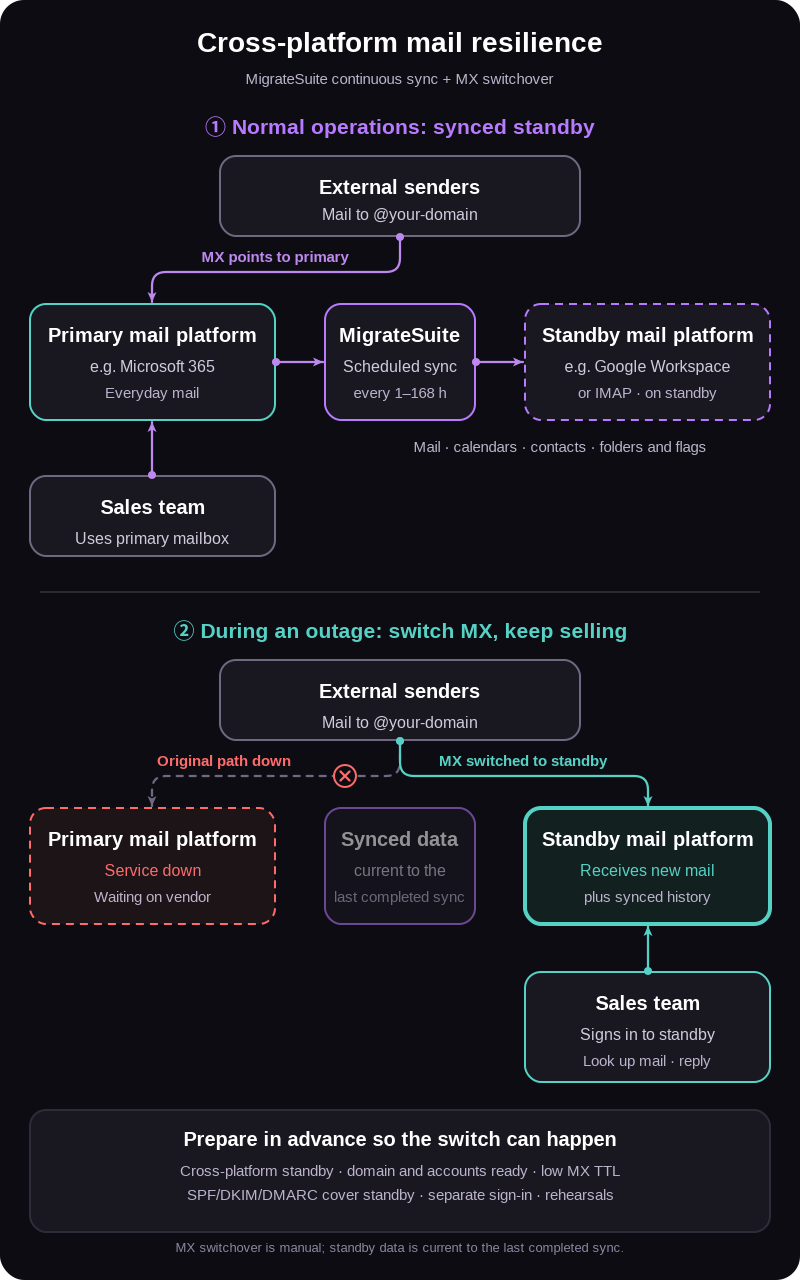
When disaster strikes, you have three steps
• Assess the impact: when the primary mail service is down, start your rehearsed response plan.
• Switch MX: point the domain's MX record to the standby platform so new mail goes to a mailbox that still works. Sending servers usually queue and retry, and mail arrives once the new MX takes effect.
• Keep selling: staff sign in to the standby mailbox, look up past correspondence, answer customers and keep sending and receiving.
While others wait for an update, you are already handling orders. It is not a promise of zero disruption; it is a response you can start yourself, which beats waiting for a single vendor to recover.
Why sales needs it most
Every sales email carries a quote, an order or a customer's trust. Compare the cost of one outage, such as delayed deals, customers left waiting and catch-up work, with the cost of a standby plan. A continuously synced standby mailbox is a controlled investment that keeps you in control when it matters most.
Keep the decision in your hands
How fast you can switch depends on preparation:
• Choose a standby platform that differs from your primary one. If your primary mailbox is on Microsoft 365, keep the standby on Google Workspace or an IMAP mail service, and vice versa, so one incident cannot affect both.
• Set up the domain and accounts on the standby platform in advance, and lower the MX record's TTL so the switch takes effect faster.
• Configure SPF, DKIM and DMARC so mail sent from the standby mailbox is delivered.
• Make sure signing in to the standby mailbox does not depend on the primary platform's single sign-on, such as Microsoft Entra ID.
• Document switchover and switch-back steps, and rehearse them regularly.
Once you are prepared, an outage is no longer something you wait out; it is an incident you can handle.
Start with the teams that cannot go dark
You do not have to cover the whole company at once. Start with sales, customer service and other teams that cannot afford to lose email. Share your number of domains, the accounts that need a standby, your current platform, and the data lag and switchover time you can accept, and we will help assess the sync method, schedule and validation approach, and help plan and rehearse the MX switchover and advance setup; during an outage, your team runs the switch using the rehearsed steps.
Notes
The standby mailbox is current to the last completed sync, and the schedule interval can be set from 1 to 168 hours. Sync mainly adds new data and is not a real-time mirror. The MX switch is manual, and how quickly it takes effect depends on your DNS settings. Switching back and bringing over mail received during the outage should be planned and verified in rehearsals. Actual scope follows assessment and pilot results.